The Google Calendar integration allows you to import events directly from your Google Calendar into your website.
You can choose to have imported Google Calendar events display alongside events added directly to your website, giving you the flexibility to manage events from either location.
Alternatively, you can enable Mirror Mode, which keeps your website calendar fully synchronized with Google Calendar. When this option is enabled, any events not found on your Google Calendar will be removed from your site calendar so both calendars always match exactly.
This flexibility allows you to manage events partially or entirely within Google Calendar while still taking advantage of your website’s event features such as calendars, event lists, upcoming events, and countdown timers.
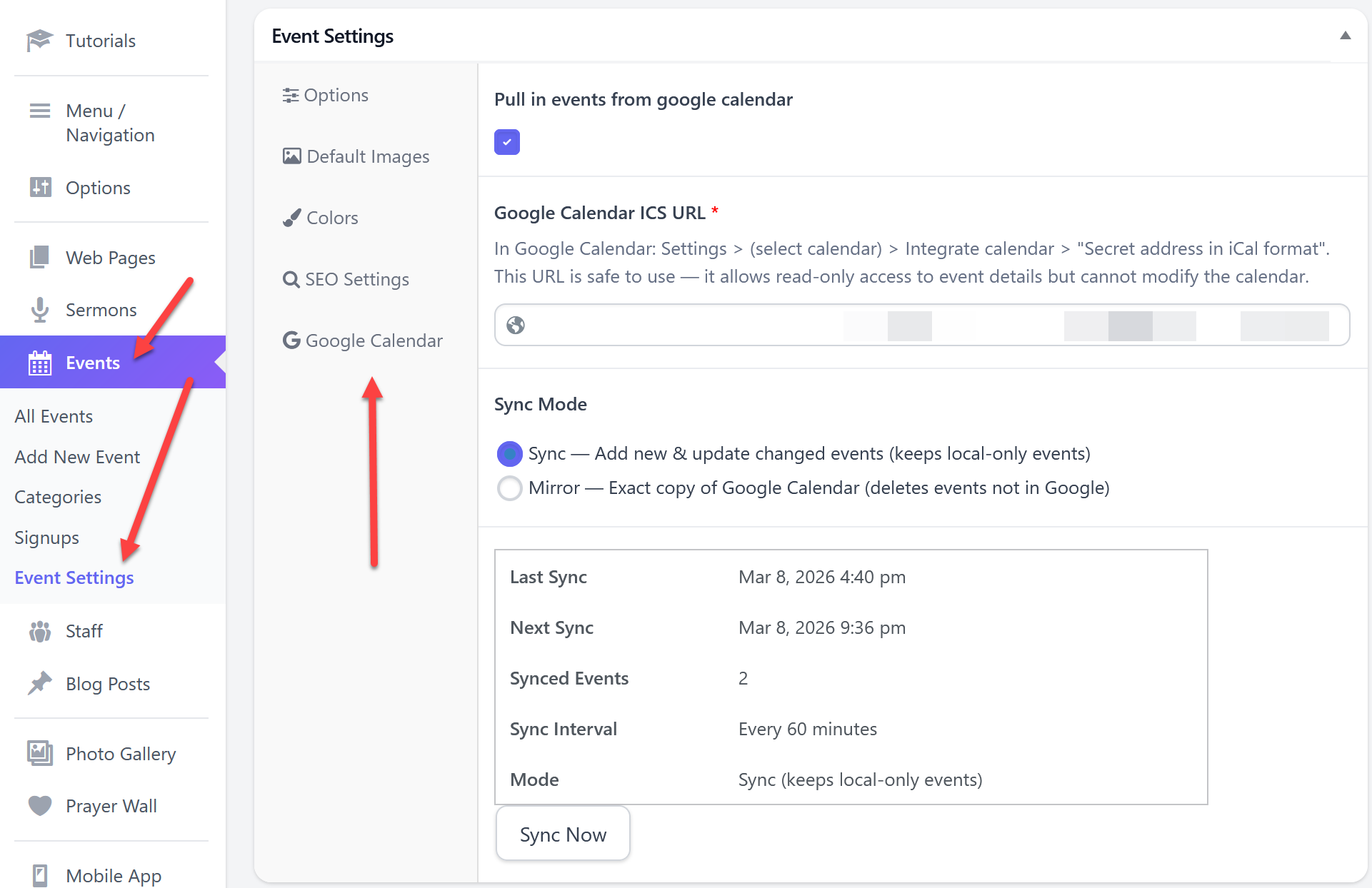
- Got to Events > Events Settings and click the Google Calendar tab.
- Select the option to pull in events from google calendar.
- In Google Calendar: Settings > (select calendar) > Integrate calendar > "Secret address in iCal format". This URL is safe to use — it allows read-only access to event details but cannot modify the calendar.
- Back on the event settings page paste in the URL copied in step 4.
- Choose the mode you want Sync or Mirror then click the update button.
The site will check your google calendar hourly and update the site with any changes found.

 Add your logo in the admin